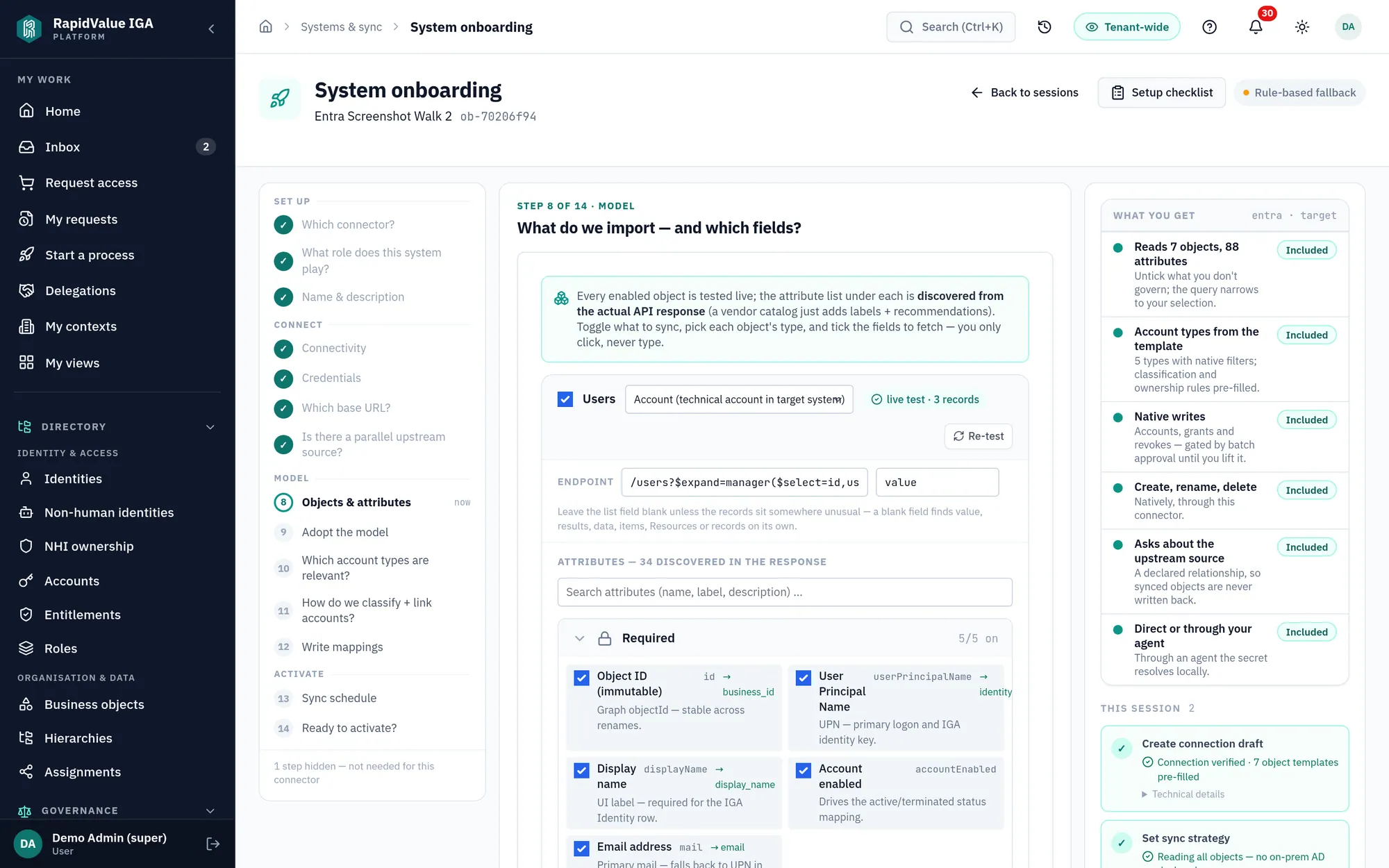
$ every product image on this site is an unretouched screenshot of the running platform — demo tenant, fictional people, captured live
📸 The whole product, as it runs

Six chapters.
Zero concept art.

Every image below is an unretouched capture from a running tenant with fictional demo people — click any thumbnail to put that screen on stage, click the screen to zoom. What you see here is what you log into on day one.

Chapter 1 · Onboard

Connected and syncing before the coffee's cold.

Every connector starts in a guided wizard: pick the vendor, drop in credentials, watch the schema auto-discover, confirm the suggested mappings against live records from your own system.

  • 20 connectors: 14 vendor templates — Entra ID, Active Directory, Exchange Online, Google Workspace, Workday, SuccessFactors, Salesforce, ServiceNow, Box, AFAS, TOPdesk, Nmbrs, Atlassian and GitHub — plus six generic engines: REST, SCIM 2.0, LDAP, SQL, SFTP-CSV and SMB/NTFS, for everything else
  • Live endpoint test at every step — you never configure blind
  • Writes stay batch-gated for your approval until you take the training wheels off
app.rapidvalue.eu/onboarding · credentials
Guided wizard — credentials step
the guided wizard — every step named up front, and the counter only counts the ones your system actually needs

Chapter 2 · See

Finally answer "who has access to what — and should they?"

One sync in, the platform scores every identity, flags what's wrong, and puts the findings in a single advisor inbox — prioritized, with the fix one click away.

  • Risk score per identity with a readable breakdown — not a black box
  • Orphans, dormant grants, unowned service accounts, SoD conflicts, peer outliers
  • Executive numbers and per-person drill-down from the same live model
app.rapidvalue.eu/posture
Posture dashboard
posture dashboard — risk distribution per department, and the peer outliers behind it

Chapter 3 · Govern

Governance in business language, not consultant dialect.

Role mining turns access patterns into plain-language proposals you can formalize in one click. Policies are built visually, with the blast radius simulated live before you save. The consulting workshop is the product.

  • "12 people in Finance share this access" — a business story with a coverage number, not a cluster ID
  • App mining does the same on the application axis: the App-… group families in your directory become real applications, in a pre-filled onboarding wizard
  • Live simulation: exactly who a policy touches, named — and what they'd get. Tighten a policy and it names the people who stop matching too, because that side is a revoke on a clock
  • Self-service requests routed through approval chains you design visually — the review step shows which account each right lands on, and creates the missing one
app.rapidvalue.eu/role-mining
Role mining
role mining — plain-language proposals, one-click formalize

Halfway. Rather see this on your own data?

A 30-minute kickoff gets your HR feed and one system connected — today.

Book the 30-min kickoff

Chapter 4 · Prove

Audit-ready every day — not the week before.

Reconciliation compares expected against actual access on every run and records a per-grant reason. Reviews run continuously, as campaigns, or on an event — a transfer or a new grant spawns one now — and audit packs generate from live data on an immutable, hash-chained trail.

  • Every difference explained: "expected via policy X" / "not expected — flagged"
  • Drift is decided per item — Keep it (certified, no write) or Remove it — with bulk available only once you can see what you'd be bulking. The same holds for approvals: forty identical decisions are one call over the two reviewer lanes, each item walking the exact authority path a single click would — quorum, self-review block, delegated marker and all
  • Reviews grouped per account — where shared and privileged risk actually lives
  • SOX · ISO 27001 · HIPAA · GDPR packs, one click, from the live model
app.rapidvalue.eu/sol-ist-dashboard
Access posture — expected vs actual
access posture — expected vs actual, prioritized

Chapter 5 · Operate

Joiners, movers, leavers — handled, with receipts.

Your HR source drives the lifecycle: joiners get birthright access, movers get reviewed, leavers get cleaned up. Every write is visible, batchable, and capped by safety limits; failures land in a triage queue instead of a void — and a failure class has an owner. Retries, auth refusals and not-found-in-target are counted per system per class, with the size, whether it is growing, and a drill straight into the rows the count was made of. On our own dev tenant that first count came back at 4,876.

  • Transfers show the actual field changes — and the review they triggered
  • Managers act on their team's access in business terms: keep, flag, revoke
  • Blast-radius caps: a runaway policy stops at the threshold, not at your AD
app.rapidvalue.eu/jml
Joiners movers leavers
lifecycle monitor — what happened, to whom, what the platform did

Where the work converges

One inbox does the work. One advisor does the thinking.

Every review, approval, exception and fix lands in a single inbox — and a platform-wide advisor watches the whole model, turning what it detects into decisions you can take on the spot.

app.rapidvalue.eu/inbox
the inbox — every decision and task across governance sources, opened and actionable
the spine — every decision, task and finding assigned to you, in one queue

The inbox is the spine

Certifications, approvals, failed provisioning jobs, lifecycle exceptions, advisor findings — governance sources collapse into one queue, split into three lanes: decide, do and review. Each person sees only their own — reviewers get reviews, the helpdesk gets the do-queue, auditors read-only. High-volume findings roll up by area, so you triage a handful of cards instead of thousands of rows.

app.rapidvalue.eu/advisor
the advisor — a detected SoD violation opened, explained and routed to the named people who own it
the brain — 49 detectors scan the model and route each finding to the named people who own it

The advisor is the brain

49 detectors scan, each on its own schedule, for what's wrong or improvable — toxic combinations, dormant access, unowned service accounts, config gaps. One of them watches the platform's own background jobs: 45 of them keep the model converged, and a job that quietly stops running is itself a finding. Each finding arrives explained and routed to the named people who own it — notified in-app and by email, not dumped on one admin. It lives in your posture view, ranked so the signal surfaces first, with the fix one click away.

Chapter 6 · Non-human identities

Service accounts and AI agents — finally owned.

Non-human identities get the same governance as people: a typed identity, a named owner, a risk score, dormancy detection tuned to machine behaviour, and a yearly ownership attestation seeded out of the box.

  • Every service account, bot and AI agent with owner, risk and credential-rotation age
  • Unowned NHIs are a finding, not a fact of life — and the "object owner" role is not assigned, it is derived. Own something and you have it; own nothing and you do not. Nothing else grants it, and the API refuses a manual add
  • Dormancy thresholds tuned for machines — cron jobs aren't leavers
app.rapidvalue.eu/nhi
Non-human identity overview
NHI overview — owner, classification, credential rotation and risk per machine identity

You've seen the whole product. Now see yours.

Every screenshot above is the running product on demo data — nothing staged, nothing retouched. The next screens can be your own tenant on your own data, and connecting the first system takes a 30-minute kickoff, not a project.

Bring your HR feed plus one system you trust us to read — that is all the kickoff needs. No NDA, no second call with a sales engineer, no procurement form.